

The Canvas
In Fahrenheit: with the SDK switched to Fahrenheit (SetTemperatureUnit() and its counterparts, see Temperatures in Fahrenheit), every temperature on this page is read and written in Fahrenheit, and every difference in Fahrenheit degrees; the samples are unchanged.
Overview
A canvas is a working area the camera's picture is placed into, so it can be turned, zoomed and slid around until it lines up the way you want it. A camera bolted at an awkward angle, a picture that needs squaring up against a machine, a view that wants framing differently from the sensor's own rectangle: that is what the canvas is for.
The important part is what it does not do. Placing a camera on a canvas does not change a single measured temperature. Rotate the picture by thirty-seven degrees, zoom in, drag it into a corner, and a measuring area sitting on a hot bearing keeps reporting exactly the numbers it reported before you touched anything: not close, the same. That is not a happy accident; it is the reason the feature is built this way. The picture on screen is resampled, because it is a picture. Measurement is done somewhere else entirely: the measuring area is mapped back through the placement into the camera's own frame, and the original sensor pixels are read there. No temperature is ever interpolated, averaged or otherwise invented.
using namespace optris::sdk;

Canvas canvas = Canvas::Of(1024, 768);
canvas.placements.push_back(
    Placement::Centred(imager->GetWidth(), imager->GetHeight(),
                       {0.5f, 0.375f},   // where the frame's centre goes
                       0.8f,             // zoom
                       30.0f));          // degrees
imager->Canvas().Set(canvas);
optris_sdk_vec2 at = {0.5F, 0.375F};  /* the frame's centre goes here */
optris_sdk_placement placement;
optris_sdk_canvas *canvas = NULL;
uint32_t frame_w = 0;
uint32_t frame_h = 0;

optris_sdk_imager_get_width(imager, &frame_w);
optris_sdk_imager_get_height(imager, &frame_h);

optris_sdk_canvas_create(1024, 768, &canvas);
optris_sdk_placement_init(&placement, sizeof(placement));
optris_sdk_placement_centred(frame_w, frame_h, at,
                             0.8F,    /* zoom */
                             30.0F,   /* degrees */
                             &placement);
optris_sdk_canvas_add_placement(canvas, &placement);

optris_sdk_imager_set_canvas(imager, canvas);
optris_sdk_canvas_free(canvas);       /* the imager copied it */
using var canvas = new Canvas(1024, 768);
canvas.AddPlacement(Placement.Centred(
    (uint)camera.Width, (uint)camera.Height,
    at: new Vector2(0.5f, 0.375f),  // where the frame's centre goes
    zoom: 0.8f,
    rotationDeg: 30.0f));
camera.SetCanvas(canvas);
canvas = optris_sdk.Canvas(1024, 768)
canvas.add_placement(optris_sdk.Placement.centred(
    camera.width, camera.height,
    at=(0.5, 0.375),      # where the frame's centre goes
    zoom=0.8,
    rotation_deg=30.0))
camera.set_canvas(canvas)
let mut canvas = Canvas::new(1024, 768)?;
canvas.add_placement(&Placement::centred(
    camera.width()?,
    camera.height()?,
    (0.5, 0.375), // where the frame's centre goes
    0.8,          // zoom
    30.0,         // degrees
)?)?;
camera.set_canvas(&canvas)?;
Trying it in the showcase
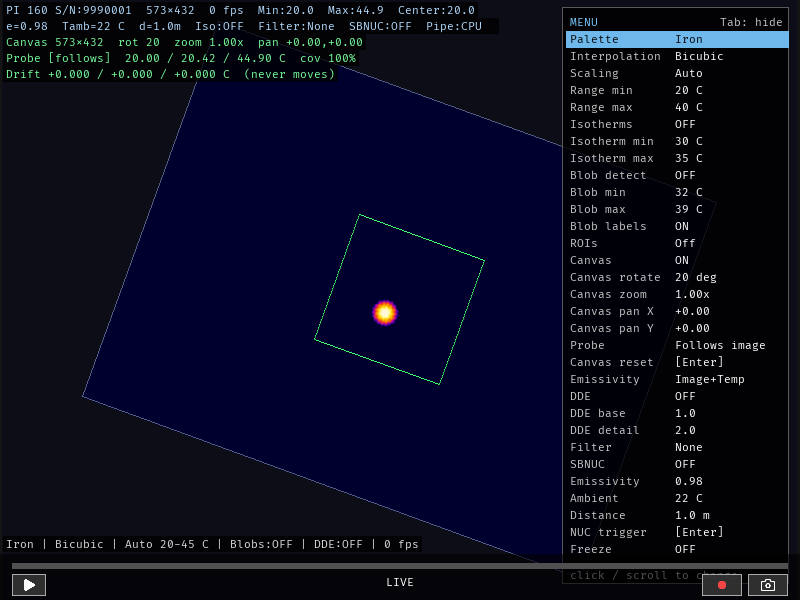
The SDK showcase has the whole thing wired up, so it can be handled before it is coded against. Press C to turn the canvas on, then drag the picture about.
| drag | move the picture |
| right-drag, or Shift+drag | turn it; grab it and twist |
| wheel | zoom about the pointer |
| Ctrl+drag | move the measuring area instead of the picture |
[ ] |
turn by half a degree (Ctrl: a tenth, Shift: 15) |
L |
square it up: snap to the nearest right angle, keeping the zoom and pan |
+ - |
zoom |
F |
switch the measuring area between following the image and staying fixed on the canvas |
0 |
reset the placement entirely: angle, zoom and pan |
C |
canvas off |
The same controls are in the menu, under Canvas.
The half-degree step and the L key are there for the commonest real job: a camera bolted to a bracket a couple of degrees off true. Nudge it to 2.5 deg (the angle is shown to a tenth, so it can be read back and reproduced) and press L when you want the tilt taken out again without losing the framing you set up around it. 0 is the blunt instrument that resets everything.
Three lines appear over the image. The first is the placement. The second is a measuring area's readings and its coverage. The third is the point of the exercise: the difference between those readings and the readings taken before anything was moved. Turn the picture through a full circle, zoom it, drag it into a corner: the drift line stays at +0.000, because the area is measured in sensor space no matter where the picture has been put.
Press F and the area stops following the image. Now the picture slides underneath it, the readings change (correctly, it is looking at something else), and as the area passes over the edge of the camera its outline turns amber and the coverage falls below 100 per cent. Drag it clear of the picture entirely and it reports no reading at all rather than a number.
Two flags help when showing it to someone or checking it on a build machine: --canvas starts with the camera already placed, and --sweep drives the placement continuously through the same calls the mouse makes, printing the readings and the drift to the console once a second. --shot <file> writes the window to a BMP and exits, which is where the picture above came from.
The same things done from code are three example programs, in each of C++, C, C#, Python and Rust, in the canvas area of the example set: rotate_and_zoom turns and zooms the picture and traces a canvas reading back to its sensor pixel, pan_live drags it while the camera streams under a fixed spot and a spot that follows it, and composite places the colour picture into a larger canvas with a CanvasMap. Each runs against the simulated camera and exits 1 if a reading came from the wrong pixel.
Coordinates
Canvas coordinates follow the same rule as region coordinates (see Coordinates): the origin is the top-left, and both axes are divided by the canvas width. So x runs 0..1 and y runs 0..height/width.
A Placement is the affine transform that takes a point in the camera's frame to a point on the canvas. Its inverse takes a point on the canvas back into the camera's frame, which is how measuring areas are measured. Both are Matrix3 (the same 3×3 affine regions already use), so there is one geometry model in the SDK, not two.
Placing a camera
The everyday way to build a placement is Placement::Centred(), which puts the frame's centre where you ask for it and turns and zooms the picture about that centre, which is what "rotate the image" means to anyone using it.
Once placed, a UI drives it live through Imager::Canvas(). The edit runs under the same lock the frame thread reads the placement with, so dragging while frames arrive is safe:
imager->Canvas().EditPlacement(0, [&](Placement &p) {
  p.SetRotationDeg(angle, frame_w, frame_h);   // turns about its own centre
  p.SetZoom(zoom, frame_w, frame_h);           // zooms about its own centre
  p.Pan({dx, dy});                             // slides it
});
/* No callback across the ABI: change your own copy and swap it in.
 * The swap happens under the lock the frame thread reads the
 * placement under, so it needs no read-modify-write of the canvas. */
optris_sdk_vec2 delta;
delta.x = dx;
delta.y = dy;

optris_sdk_placement_set_rotation_deg(&placement, angle, frame_w,
                                      frame_h);
optris_sdk_placement_set_zoom(&placement, zoom, frame_w, frame_h);
optris_sdk_placement_pan(&placement, delta);
optris_sdk_imager_set_placement(imager, 0, &placement);
// A Placement is a value here, so the three are non-mutating.
Placement moved = placement
    .WithRotationDeg(angle, frameWidth, frameHeight)
    .WithZoom(zoom, frameWidth, frameHeight)
    .Panned(new Vector2(dx, dy));
camera.SetPlacement(0, moved);
placement.set_rotation_deg(angle, frame_w, frame_h)
placement.set_zoom(zoom, frame_w, frame_h)
placement.pan((dx, dy))
camera.set_placement(0, placement)
placement.set_rotation_deg(angle, frame_w, frame_h)?;
placement.set_zoom(zoom, frame_w, frame_h)?;
placement.pan((dx, dy))?;
camera.set_placement(0, &placement)?;
Only C++ has the callback. Every binding changes its own Placement and hands it back with set_placement, which swaps it under the same lock, so dragging while frames arrive is equally safe. .NET's Placement is a value and its three movers return a new one rather than mutating.
EditPlacement() returns false when there is no placement at that index; index 0 is this camera. SetFrameCentre(at, frame_w, frame_h) moves the frame's centre to a given canvas point. The three setters take the frame size because the matrix alone cannot say where the frame's centre is. Zoom(), RotationDeg() and FrameCentre(frame_w, frame_h) read those values straight back off the matrix, exactly for anything the setters produced; HasShear() says when they are an approximation, and IsIdentity() says the frame is placed unchanged.
Anything the friendly setters cannot say (a shear, an alignment worked out by a calibration step) is written straight into Placement::matrix, and everything downstream carries on working, because the only thing measurement asks of a placement is its inverse.
zoom is in canvas units rather than pixels: 1.0 makes the picture exactly as wide as the canvas. That deliberately does not change meaning when the canvas is resized. For one canvas pixel per camera pixel, pass float(frame_width) / canvas_width.
A singular placement measures nothing. Placement::Inverse() returns std::nullopt when the matrix has collapsed (a zoom of 0, or a scale of zero on either axis) because then no canvas point names a frame point and there is nothing honest to measure. MeasureSpaceOf() and ToFrame() return std::nullopt for the same reason. A UI that lets a zoom reach 0 should clamp it rather than wait for the readings to stop.
Canvas::Of(w, h) builds a canvas of a fixed extent; leaving width or height at 0 makes that axis follow the camera. Canvas::IsPassThrough(frame_w, frame_h) is checked rather than computed, so an application can leave a Canvas set permanently and pay nothing for it until something is placed.
What changes when a camera is placed
Two things, and nothing at all until you place something; the default canvas is a pass-through.
The colour image follows the canvas. The colour callbacks (SetBgraCallback(), and SetRgbCallback(), which is converted from the same composited picture) deliver the canvas composite, at the canvas's size. The thermal, raw and energy callbacks do not follow it: they stay sensor-native, because resampled thermal data is exactly what this design exists to avoid. Registered external buffers stay sensor-native too, since their size was agreed against the frame.
Measuring areas are read as canvas coordinates. They stay where they are on the canvas while the picture moves underneath them. If you would rather a region followed the picture (it is marking a feature in the scene, not a spot on the screen), carry it across with one call:
const Region placed = ToCanvas(my_region, placement);
imager->Regions().Edit(id, [&](Region &r) { r.geometry = placed.geometry; });
optris_sdk_region *placed = NULL;

optris_sdk_region_copy_to_canvas(my_region, &placement, &placed);
optris_sdk_imager_update_region(imager, id, placed);
optris_sdk_region_free(placed);
using Region placed = myRegion.CopyToCanvas(placement);
camera.UpdateRegion(id, placed);
placed = my_region.copy_to_canvas(placement)
camera.regions.update(region_id, placed)
let placed = my_region.copy_to_canvas(&placement)?;
camera.update_region(id, &placed)?;
That is an edit in place. There is no remove-and-re-add, the region keeps its id, and any alarm on it survives.
ToFrame(region, placement) is the other direction: a region authored on the canvas, expressed in the camera's own frame, which is the form it is actually measured in. It returns std::nullopt for a singular placement.
Measurement stays exact
A region on the canvas is measured by composing its transform with the inverse placement, which lands it in the camera's own frame, and reading the sensor's own pixels there. One matrix multiply per shape, and then it measures exactly as it always has.
Reported locations (hot spot, cold spot, centre) come back in canvas coordinates, so they can be drawn where the user is looking, but the temperature at each of them is the untouched sensor value.
Coverage: regions that hang off the sensor
Pan a camera around a canvas and a region drawn on the canvas can end up with part of itself over nothing. The SDK measures the part that had data and tells you how much that was, in RegionStats::coverage:
if (auto r = imager->Regions().Get(id); r && r->stats.valid) {
  if (r->stats.coverage < 0.8f) {
    // 20 degrees across this region, or 20 degrees across the
    // fraction of it that had a camera behind it?
  }
}
optris_sdk_region_stats stats;

optris_sdk_region_stats_init(&stats, sizeof(stats));
optris_sdk_imager_get_region_stats(imager, id, &stats);
if (stats.valid && stats.coverage < 0.8F) {
  /* 20 degrees across this region, or 20 degrees across the fraction
   * of it that had a camera behind it? */
}
RegionStats stats = camera.GetRegionStats(id);
if (stats.IsValid && stats.Coverage < 0.8f)
{
    // 20 degrees across this region, or 20 degrees across the
    // fraction of it that had a camera behind it?
}
stats = camera.regions.stats(region_id)
if stats.valid and stats.coverage < 0.8:
    # 20 degrees across this region, or 20 degrees across the
    # fraction of it that had a camera behind it?
    pass
let stats = camera.region_stats(id)?;
if stats.valid && stats.coverage < 0.8 {
    // 20 degrees across this region, or 20 degrees across the
    // fraction of it that had a camera behind it?
}
coverage is 1.0 whenever the region is wholly on the sensor (the ordinary case, and one that costs nothing to establish). It is published as SignalField::kCoverage, so an alarm rule can refuse to fire below a floor rather than alarming on a corner. A region entirely off the sensor reports no reading at all rather than a plausible-looking number.
This also applies without a canvas: a region drawn partly off the frame edge measures only the pixels it had, and coverage says so.
Voids
Turn a rectangle inside a rectangle and there are corners left over. Canvas pixels with no camera behind them are painted Canvas::void_color, opaque black by default. Set its alpha to zero for a canvas composited over something else.
The compositing itself is a precomputed canvas-pixel → frame-pixel index table, CanvasMap, rebuilt when the placement changes and merely indexed on a frame. It is display only: it resamples by nearest source pixel, and nothing measured is ever read through it. Along the boundary its Coverage() holds the real fraction of each pixel the frame covers, blended with the void colour, so a turned picture has a clean edge rather than a staircase. Fill() reports how much of the canvas has a camera behind it, which is how a UI tells "zoomed out" from "panned away". It is counted by one sample per canvas pixel, at its centre: a part-covered edge pixel counts in full when its own centre is covered and not at all when it is not. So it is a count of pixels rather than a coverage-weighted area (Fill() times the canvas's width times its height is a whole number) and it differs from both the coverage sum and the number of pixels holding a source index, around the perimeter only.
Persistence
The canvas is part of ImagerConfig, and SaveConfig() / LoadConfig() carry it alongside the regions. They belong together: restoring the measuring areas of a turned, zoomed view without restoring the view would put every one of them in the wrong place. The placement is stored as its matrix, so one produced by any route survives the round trip. A config written before canvases existed loads unchanged.
From C, and the other languages
The canvas crosses the flat C ABI, so a program that is not written in C++ can place a frame too. The spellings mirror the C++ ones one for one: optris_sdk_canvas and optris_sdk_placement for the two types, optris_sdk_frame_centre_of() for the centre of a frame, optris_sdk_placement_centred() to place one, optris_sdk_imager_set_canvas() to hand the scene to a camera, and optris_sdk_imager_set_placement() to move a placement while frames are arriving.
#include <optris/sdk_c.h>

optris_sdk_imager *imager = NULL;     /* an open camera */
uint32_t frame_width = 640;
uint32_t frame_height = 480;

optris_sdk_canvas *canvas = NULL;
optris_sdk_canvas_create(1024, 768, &canvas);

/* The middle of a 1024x768 canvas. NOT (0.5, 0.5): both axes are
   divided by the width, so this is (0.5, 0.375). */
optris_sdk_vec2 middle;
optris_sdk_frame_centre_of(1024, 768, &middle);

optris_sdk_placement placement;
optris_sdk_placement_init(&placement, sizeof(placement));
optris_sdk_placement_centred(frame_width, frame_height, middle,
                             0.8f, 30.0f, &placement);
optris_sdk_canvas_add_placement(canvas, &placement);

optris_sdk_imager_set_canvas(imager, canvas);
optris_sdk_canvas_free(canvas);       /* the imager copied it */

/* Afterwards, dragging it about while the stream runs. The swap
   happens under the lock the frame thread reads the placement
   under, so this needs no read-modify-write of the whole canvas. */
optris_sdk_vec2 delta;
delta.x = 0.05f;
delta.y = 0.0f;
optris_sdk_placement_pan(&placement, delta);
optris_sdk_imager_set_placement(imager, 0, &placement);
Two habits carry over from the C++ side because they bite the same way. A frame's centre is not (0.5, 0.5); ask optris_sdk_frame_centre_of(), which on a 4:3 camera answers (0.5, 0.375). And the canvas handle is yours: the camera takes a copy, so free it whenever you like, including straight after handing it over.
If you composite the picture yourself rather than reading the RGBA callback, the same index table CanvasMap is reachable from C, but as two calls, and this is the one place the C surface does not read like the C++ one. optris_sdk_canvas_map_create() mints an empty table; optris_sdk_canvas_map_update(map, canvas, frame_width, frame_height) is what fills it in. Until that first update the table holds nothing, ..._is_empty() says so, and the extent reads 0 x 0, so a program that creates a table and goes straight to optris_sdk_canvas_map_read_indices(), ..._read_coverage() or ..._composite() gets an empty answer rather than an error. Call ..._update() every frame if you like: it returns immediately unless something that affects the mapping has changed, which is why a drag costs a rebuild and an ordinary frame does not. Free it with optris_sdk_canvas_map_free(). A camera that has been given a canvas already keeps its own and you need none of this.
What reaches which language today. The declarations generated from the C header carry all of it, so a Python program using the package's ctypes layer and a Rust program using the optris-sdk-sys crate can call every entry point above.
Python now offers the canvas properly, as a hand-written surface rather than raw ctypes: optris_sdk.Canvas, optris_sdk.Placement, optris_sdk.CanvasMap and optris_sdk.frame_centre_of, with Camera.set_canvas, Camera.copy_canvas and Camera.set_placement to reach a camera, CameraConfig.copy_canvas to read one out of a saved configuration, and Region.copy_to_canvas / Region.copy_to_frame for the mapping that keeps measurement exact. All forty entry points of this feature, measured by scripts/check_binding_parity.py.
Rust now offers it too, as optris_sdk::{Canvas, Placement, CanvasMap, frame_centre_of, NO_SOURCE}, with Camera::set_canvas, Camera::canvas, Camera::set_placement, CameraConfig::canvas and Region::copy_to_canvas / Region::copy_to_frame. All forty entry points, same as Python.
C# offers it too, and the set is complete: Optris.Sdk.Canvas, Placement, CanvasMap, FrameGeometry.CentreOf, with ThermalCamera.SetCanvas / GetCanvas / SetPlacement, CameraConfiguration.GetCanvas and Region.CopyToCanvas / CopyToFrame. All three bindings now reach all forty entry points.
The gate counts it that way too: check_binding_parity.py credits all three bindings with all 21 entry points of the canvas family. It used to credit .NET with 19, because optris_sdk_canvas_free and optris_sdk_canvas_map_free are called only from Interop/SafeHandles.cs, which is where a native free belongs, and the script excluded that whole directory. It now excludes only the P/Invoke declarations in Interop/NativeMethods.cs.
Canvas or Orientation?
Two different jobs, and they compose.
Orientation |
Canvas |
|
|---|---|---|
| acts on | the thermal data | the view |
| angles | quarter turns and mirrors only | arbitrary |
| lossless | yes, an exact index remap | resampled: display only |
| for | a camera bolted on its side | framing, alignment, lining up |
| voids | none, ever | expected, and harmless |
Use Orientation when the camera is physically mounted rotated and you want one coordinate system with no mapping anywhere. Use a Canvas when you want to arrange the view without touching the data.
Several cameras
Canvas::placements is a list because a placement is per-camera. The SDK's Imager drives one camera and fills one entry; stitching several streams into one scene is more entries and a compositor that iterates them.
What is deliberately not built is anything that resolves two cameras against each other: no seam correction, no radiometric reconciliation between cameras that disagree about the same scene, no coverage-weighted combination of their readings. Where placements overlap today, the later one simply paints over the earlier. The coverage fraction above is the mechanism that combination will be built on when it arrives.