

Virtual Imager (Simulated)
In Fahrenheit: with the SDK switched to Fahrenheit (SetTemperatureUnit() and its counterparts, see Temperatures in Fahrenheit), every temperature on this page is read and written in Fahrenheit, and every difference in Fahrenheit degrees; the samples are unchanged.
Overview
The virtual imager generates synthetic thermal frames without any camera hardware. Create it with Imager::Create(SimulatedConfig{...}). It is an ordinary Imager: the same callbacks, the same measuring areas and alarm rules, the same recording. Differences from a live camera that matter for testing are called out below, notably flag cycles. Imager::IsSimulated() tells the two apart.
Virtual imagers are primarily used for:
- Unit testing without hardware dependencies
- CI/CD pipelines that need to verify SDK integration
- Demos and prototyping before hardware is available
- Benchmarking pipeline performance with known data
Creating a Simulated Imager
The configuration object is named differently in each binding, and each name is right for its language: a C++ SimulatedConfig struct, a C optris_sdk_simulated_config with an _init, a .NET SimulatedCameraOptions with object-initialiser syntax, a Python SimulatedCamera built by keyword, and a Rust SimulatedConfig builder. Only the field meanings are shared.
#include <optrissdk.h>

optris::sdk::SimulatedConfig cfg;
cfg.width = 160;
cfg.height = 120;
cfg.framerate = 30;
cfg.pattern = optris::sdk::TestPattern::kGradient;
cfg.temp_min_c = 20.0f;
cfg.temp_max_c = 80.0f;
cfg.seed = 42;

auto imager = optris::sdk::Imager::Create(cfg);
#include "optris/sdk_c.h"

optris_sdk_simulated_config cfg;
optris_sdk_imager *imager = NULL;

/* _init first, always: it writes struct_size and the defaults, and a
 * struct the library reads without it is a struct of whatever was on
 * the stack. */
optris_sdk_simulated_config_init(&cfg, sizeof(cfg));
cfg.width = 160;
cfg.height = 120;
cfg.framerate = 30;
cfg.pattern = OPTRIS_SDK_PATTERN_GRADIENT;
cfg.temp_min_c = 20.0F;
cfg.temp_max_c = 80.0F;
cfg.seed = 42;

optris_sdk_imager_create_simulated(&cfg, &imager);
using Optris.Sdk;

await using ThermalCamera simulated = ThermalCamera.OpenSimulated(
    new SimulatedCameraOptions
    {
        Width = 160,
        Height = 120,
        FrameRate = 30,
        Pattern = TestPattern.Gradient,
        MinTemperature = 20.0f,
        MaxTemperature = 80.0f,
        Seed = 42,
    });
import optris_sdk

config = optris_sdk.SimulatedCamera(width=160, height=120, framerate=30,
                                    pattern=optris_sdk.PATTERN_GRADIENT,
                                    temp_min_c=20.0, temp_max_c=80.0,
                                    seed=42)

with optris_sdk.Camera.simulated(config) as simulated:
    pass
use optris_sdk::{Camera, SimulatedConfig, TestPattern};

// A builder, so every field that is not named keeps its default.
let cfg = SimulatedConfig::new()
    .resolution(160, 120)
    .framerate(30)
    .pattern(TestPattern::Gradient)
    .temperature_range(20.0, 80.0)
    .seed(42);

let simulated = Camera::simulated(&cfg)?;
The returned Imager supports the standard operations: callbacks, pull-based frame acquisition, measuring areas, alarm rules, snapshots and recording. Recordings it makes play back with Player::Open() like any other.
Test Patterns
Seven test patterns are available. All but kNoise are fully determined by the configuration; kNoise is determined by seed (see Deterministic Output). Each is simple enough that a test can restate what it draws and assert on it. The seventh, kFrameCycle, is value 11 and comes after the scenes in the enum only because values are appended.
For a picture that looks like thermal imagery rather than a test card (a demonstration, a screenshot, an example someone runs without a camera on the desk), see Scenes.
Gradient
A linear temperature gradient across the frame, set by gradient_direction. Horizontal by default: temp_min_c on the left edge, temp_max_c on the right. Vertical puts the minimum on the top edge and the maximum on the bottom.
optris::sdk::SimulatedConfig cfg;
cfg.pattern = optris::sdk::TestPattern::kGradient;
cfg.gradient_direction =
    optris::sdk::GradientDirection::kHorizontal;
cfg.temp_min_c = 20.0f;
cfg.temp_max_c = 80.0f;
optris_sdk_simulated_config cfg;
optris_sdk_simulated_config_init(&cfg, sizeof(cfg));
cfg.pattern = OPTRIS_SDK_PATTERN_GRADIENT;
cfg.gradient_direction = OPTRIS_SDK_GRADIENT_HORIZONTAL;
cfg.temp_min_c = 20.0F;
cfg.temp_max_c = 80.0F;
var gradient = new SimulatedCameraOptions
{
    Pattern = TestPattern.Gradient,
    GradientDirection = GradientDirection.Horizontal,
    MinTemperature = 20.0f,
    MaxTemperature = 80.0f,
};
config = optris_sdk.SimulatedCamera(
    pattern=optris_sdk.PATTERN_GRADIENT,
    gradient_direction=optris_sdk.GRADIENT_HORIZONTAL,
    temp_min_c=20.0, temp_max_c=80.0)
let cfg = SimulatedConfig::new()
    .pattern(TestPattern::Gradient)
    .gradient_direction(GradientDirection::Horizontal)
    .temperature_range(20.0, 80.0);
Uniform
Every pixel has the same temperature: the midpoint of temp_min_c and temp_max_c. Useful for testing baseline behavior.
optris::sdk::SimulatedConfig cfg;
cfg.pattern = optris::sdk::TestPattern::kUniform;
cfg.temp_min_c = 37.0f;  // All pixels at 37 C:
cfg.temp_max_c = 37.0f;  // the midpoint of min and max
optris_sdk_simulated_config cfg;
optris_sdk_simulated_config_init(&cfg, sizeof(cfg));
cfg.pattern = OPTRIS_SDK_PATTERN_UNIFORM;
cfg.temp_min_c = 37.0F;  /* All pixels at 37 C: */
cfg.temp_max_c = 37.0F;  /* the midpoint of min and max */
var uniform = new SimulatedCameraOptions
{
    Pattern = TestPattern.Uniform,
    MinTemperature = 37.0f,   // All pixels at 37 C:
    MaxTemperature = 37.0f,   // the midpoint of min and max
};
config = optris_sdk.SimulatedCamera(
    pattern=optris_sdk.PATTERN_UNIFORM,
    temp_min_c=37.0,   # All pixels at 37 C:
    temp_max_c=37.0)   # the midpoint of min and max
// One call rather than two fields: the pair is the setting.
let cfg = SimulatedConfig::new()
    .pattern(TestPattern::Uniform)
    .temperature_range(37.0, 37.0);   // the midpoint of min and max
With the defaults (20 and 40 C) that is 30 C, so set both fields to pin a specific value.
HotSpot
A circular hot region moving across a cooler background, for testing point trackers and alarm triggers.
optris::sdk::SimulatedConfig cfg;
cfg.pattern = optris::sdk::TestPattern::kHotSpot;
cfg.temp_min_c = 25.0f;  // Background temperature
cfg.temp_max_c = 90.0f;  // Hot spot peak temperature
cfg.hotspot_radius = 15;  // Radius in pixels
cfg.hotspot_speed = 20.0f;  // Motion rate
optris_sdk_simulated_config cfg;
optris_sdk_simulated_config_init(&cfg, sizeof(cfg));
cfg.pattern = OPTRIS_SDK_PATTERN_HOT_SPOT;
cfg.temp_min_c = 25.0F;     /* Background temperature */
cfg.temp_max_c = 90.0F;     /* Hot spot peak temperature */
cfg.hotspot_radius = 15;    /* Radius in pixels */
cfg.hotspot_speed = 20.0F;  /* Motion rate */
var hotSpot = new SimulatedCameraOptions
{
    Pattern = TestPattern.HotSpot,
    MinTemperature = 25.0f,   // Background temperature
    MaxTemperature = 90.0f,   // Hot spot peak temperature
    HotSpotRadius = 15,       // Radius in pixels
    HotSpotSpeed = 20.0f,     // Motion rate
};
config = optris_sdk.SimulatedCamera(
    pattern=optris_sdk.PATTERN_HOT_SPOT,
    temp_min_c=25.0,       # Background temperature
    temp_max_c=90.0,       # Hot spot peak temperature
    hotspot_radius=15,     # Radius in pixels
    hotspot_speed=20.0)    # Motion rate
let cfg = SimulatedConfig::new()
    .pattern(TestPattern::HotSpot)
    .temperature_range(25.0, 90.0)   // background, then the peak
    .hotspot(15, 20.0);              // radius in pixels, motion rate
- The background is at
temp_min_c. The peak istemp_max_cat the spot's centre, falling off as1 - d²/r²to the background athotspot_radius - The centre wanders around the frame centre within
2 × hotspot_radiuson each axis, horizontally ascos(0.1 × speed × t)and vertically assin(0.13 × speed × t), wheretis seconds of frame time; the two rates differ, so the path is not a circle hotspot_speedscales how fast it moves along that path; it is not a speed in pixels per second- Setting
hotspot_positionpins the spot and overrides the motion entirely;hotspot_speedis then ignored
Placing the spot. SimulatedConfig::hotspot_position pins it, and three calls on Imager move it without a read-modify-write of the whole config:
imager->SetSimulatedHotSpot({0.5f, 0.3f});  // pin it
auto where = imager->GetSimulatedHotSpot();  // pinned or moving
imager->ClearSimulatedHotSpot();             // let it move again
Coordinates are frame-normalized isotropic, the same space measuring areas use, so a position taken from a region's centre puts the spot inside that region with no arithmetic: x runs 0..1 and y runs 0..height/width. All three are safe to call while streaming and take effect on the next frame. On a camera with no hot spot to place (a real one, or a simulated one drawing something else) they return false, and GetSimulatedHotSpot() an empty optional, rather than throwing, so a user interface can use the getter to decide whether to offer the control.
Alarm behaviour is then drivable: place the spot, assert the alarm raised, move it away, assert it cleared, deterministically, in a fraction of a second.
Checkerboard
Alternating blocks of two temperatures, for testing spatial resolution and dead pixel repair.
optris::sdk::SimulatedConfig cfg;
cfg.pattern = optris::sdk::TestPattern::kCheckerboard;
cfg.temp_min_c = 20.0f;  // Cold blocks
cfg.temp_max_c = 60.0f;  // Hot blocks
cfg.checker_size = 8;     // Block size in pixels
optris_sdk_simulated_config cfg;
optris_sdk_simulated_config_init(&cfg, sizeof(cfg));
cfg.pattern = OPTRIS_SDK_PATTERN_CHECKERBOARD;
cfg.temp_min_c = 20.0F;   /* Cold blocks */
cfg.temp_max_c = 60.0F;   /* Hot blocks */
cfg.checker_size = 8;     /* Block size in pixels */
var checkerboard = new SimulatedCameraOptions
{
    Pattern = TestPattern.Checkerboard,
    MinTemperature = 20.0f,   // Cold blocks
    MaxTemperature = 60.0f,   // Hot blocks
    CheckerSize = 8,          // Block size in pixels
};
config = optris_sdk.SimulatedCamera(
    pattern=optris_sdk.PATTERN_CHECKERBOARD,
    temp_min_c=20.0,     # Cold blocks
    temp_max_c=60.0,     # Hot blocks
    checker_size=8)      # Block size in pixels
let cfg = SimulatedConfig::new()
    .pattern(TestPattern::Checkerboard)
    .temperature_range(20.0, 60.0)   // cold blocks, then hot
    .checker_size(8);                // block size in pixels
Exactly two temperatures: temp_max_c on the block at the top-left corner and every block diagonal to it, temp_min_c on the rest. checker_size sets the block size (0 is treated as 8).
Noise
Random temperature values within the configured range, for testing filtering and statistics under noisy conditions.
optris::sdk::SimulatedConfig cfg;
cfg.pattern = optris::sdk::TestPattern::kNoise;
cfg.temp_min_c = 15.0f;
cfg.temp_max_c = 45.0f;
cfg.seed = 42;
optris_sdk_simulated_config cfg;
optris_sdk_simulated_config_init(&cfg, sizeof(cfg));
cfg.pattern = OPTRIS_SDK_PATTERN_NOISE;
cfg.temp_min_c = 15.0F;
cfg.temp_max_c = 45.0F;
cfg.seed = 42;
var noise = new SimulatedCameraOptions
{
    Pattern = TestPattern.Noise,
    MinTemperature = 15.0f,
    MaxTemperature = 45.0f,
    Seed = 42,
};
config = optris_sdk.SimulatedCamera(
    pattern=optris_sdk.PATTERN_NOISE,
    temp_min_c=15.0, temp_max_c=45.0, seed=42)
let cfg = SimulatedConfig::new()
    .pattern(TestPattern::Noise)
    .temperature_range(15.0, 45.0)
    .seed(42);
Each pixel is a uniformly distributed random value in [temp_min_c, temp_max_c], redrawn every frame. The same non-zero seed gives the same sequence of frames; seed = 0 draws a fresh seed each time the camera is created.
FromFile
Load frame data from a file, for replaying captured reference data.
optris::sdk::SimulatedConfig cfg;
cfg.pattern = optris::sdk::TestPattern::kFromFile;
cfg.frame_file_path = "/data/reference_frames.bin";
optris_sdk_simulated_config cfg;
optris_sdk_simulated_config_init(&cfg, sizeof(cfg));
cfg.pattern = OPTRIS_SDK_PATTERN_FROM_FILE;
/* A fixed-size char array rather than a pointer: the struct carries
 * the path, so nothing of the caller's has to outlive the call. */
snprintf(cfg.frame_file_path, sizeof cfg.frame_file_path, "%s",
         "/data/reference_frames.bin");
var fromFile = new SimulatedCameraOptions
{
    Pattern = TestPattern.FromFile,
    FrameFilePath = "/data/reference_frames.bin",
};
config = optris_sdk.SimulatedCamera(
    pattern=optris_sdk.PATTERN_FROM_FILE,
    frame_file_path='/data/reference_frames.bin')
// frame_file() returns a Result, because a path that does not fit the
// struct's array is refused rather than truncated.
let cfg = SimulatedConfig::new()
    .pattern(TestPattern::FromFile)
    .frame_file("/data/reference_frames.bin")?;
- The file starts with an 8-byte header: width and height as little-endian
uint32. Frames follow, eachwidth × height16-bit pixels in the SDK internal format ((celsius * 10) + 1000), row by row - The header sets the frame size, overriding
width,heightand the device type default - Every complete frame is loaded when the camera is created, and they play in order, starting again from the first after the last; a trailing partial frame is ignored
- If the file cannot be read or holds no complete frame, the camera produces the
kUniformpattern instead
FrameCycle
The whole frame at one temperature, and a different one on every frame. It finds torn, dropped and repeated frames in whatever displays or records the camera, and makes each visible by eye, in a screenshot and to code.
optris::sdk::SimulatedConfig cfg;
cfg.pattern = optris::sdk::TestPattern::kFrameCycle;
cfg.frame_cycle_steps = 4;  // 2 to 8; 0 means the default, 4
cfg.temp_min_c = 20.0f;     // the first step
cfg.temp_max_c = 50.0f;     // the last step
optris_sdk_simulated_config cfg;
optris_sdk_simulated_config_init(&cfg, sizeof(cfg));
cfg.pattern = OPTRIS_SDK_PATTERN_FRAME_CYCLE;
cfg.frame_cycle_steps = 4;  /* 2 to 8; 0 means the default, 4 */
cfg.temp_min_c = 20.0F;     /* the first step */
cfg.temp_max_c = 50.0F;     /* the last step */
var frameCycle = new SimulatedCameraOptions
{
    Pattern = TestPattern.FrameCycle,
    FrameCycleSteps = 4,      // 2 to 8; 0 means the default, 4
    MinTemperature = 20.0f,   // the first step
    MaxTemperature = 50.0f,   // the last step
};
config = optris_sdk.SimulatedCamera(
    pattern=optris_sdk.PATTERN_FRAME_CYCLE,
    frame_cycle_steps=4,   # 2 to 8; 0 means the default, 4
    temp_min_c=20.0,       # the first step
    temp_max_c=50.0)       # the last step
let cfg = SimulatedConfig::new()
    .pattern(TestPattern::FrameCycle)
    .frame_cycle_steps(4)             // 2 to 8; 0 means the default, 4
    .temperature_range(20.0, 50.0);   // the first step, then the last
Frame n of a run is uniform at step n % N of N temperatures spaced evenly from temp_min_c to temp_max_c, both ends included, where N is frame_cycle_steps and n is the frame's FrameMetadata::sequence. With the settings above: 20, 30, 40, 50, 20, 30 and so on, one per frame. Three things follow:
- A frame that is not uniform was put together from more than one frame. A tear's seam is a straight edge between two flat colours, horizontal or vertical according to how the frames were mixed.
- A step that skips is a dropped frame, and a step that repeats is a frame shown twice, because consecutive frames always differ.
- The step a frame should show follows from its sequence number, so a consumer can check every frame it receives without keeping any state:
#include <optrissdk.h>
#include <algorithm>
#include <chrono>
#include <cmath>
#include <print>
#include <thread>

int main() {
  optris::sdk::SimulatedConfig cfg;
  cfg.width = 160;
  cfg.height = 120;
  cfg.pattern = optris::sdk::TestPattern::kFrameCycle;
  cfg.frame_cycle_steps = 4;
  cfg.temp_min_c = 20.0f;
  cfg.temp_max_c = 50.0f;

  auto imager = optris::sdk::Imager::Create(cfg);
  imager->SetThermalCallback([](const optris::sdk::ThermalFrame &frame) {
    const int16_t *pixels = frame.GetData();
    const auto *end = pixels + frame.GetDataSize();
    const bool one_value =
        std::all_of(pixels, end, [&](int16_t v) { return v == pixels[0]; });
    // Step n % 4 of 20, 30, 40 and 50 C.
    const uint32_t step = frame.GetMetadata().sequence % 4;
    const float expected = 20.0f + 10.0f * static_cast<float>(step);
    const float got = optris::sdk::InternalToCelsius(pixels[0]);
    if (!one_value || std::abs(got - expected) > 0.05f) {
      std::println("frame {}: torn or out of step ({} C, step {} is {} C)",
                   frame.GetMetadata().sequence, got, step, expected);
    }
  });
  imager->Start();
  std::this_thread::sleep_for(std::chrono::seconds(2));
  imager->Stop();
}
#include "optris/sdk_c.h"
#include <math.h>
#include <stdio.h>

/* Step n % 4 of 20, 30, 40 and 50 C, with no state kept: the step a
 * frame should show follows from its own sequence number. */
static void OnThermalFrame(const optris_sdk_frame *frame, void *user) {
  optris_sdk_frame_info info;
  const int16_t *pixels = NULL;
  size_t pixel_count = 0;
  size_t i = 0;
  int one_value = 1;
  uint32_t step = 0;
  float expected = 0.0F;
  float got = 0.0F;

  optris_sdk_frame_info_init(&info, sizeof(info));
  if (optris_sdk_frame_get_info(frame, &info) != OPTRIS_SDK_OK) {
    return;
  }
  if (optris_sdk_frame_get_data(frame, &pixels, &pixel_count) !=
      OPTRIS_SDK_OK) {
    return;
  }
  for (i = 1; i < pixel_count; ++i) {
    if (pixels[i] != pixels[0]) {
      one_value = 0;
      break;
    }
  }
  step = (uint32_t)(info.sequence % 4);
  expected = 20.0F + 10.0F * (float)step;
  got = optris_sdk_internal_to_celsius(pixels[0]);
  if (!one_value || fabsf(got - expected) > 0.05F) {
    printf("frame %llu: torn or out of step (%.1f C, step %u is %.1f C)\n",
           (unsigned long long)info.sequence, (double)got, (unsigned)step,
           (double)expected);
  }
  (void)user;
}
var cfg = new SimulatedCameraOptions
{
    Width = 160,
    Height = 120,
    Pattern = TestPattern.FrameCycle,
    FrameCycleSteps = 4,
    MinTemperature = 20.0f,
    MaxTemperature = 50.0f,
};

await using ThermalCamera cycling = ThermalCamera.OpenSimulated(cfg);
cycling.Start();

int seen = 0;
await foreach (ThermalFrame cycled in
               cycling.FramesAsync(CancellationToken.None))
{
    using (cycled)
    {
        // Step n % 4 of 20, 30, 40 and 50 C. No state kept: the step a
        // frame should show follows from its own sequence number.
        uint step = (uint)(cycled.Metadata.Sequence % 4);
        float expected = 20.0f + 10.0f * step;
        float got = cycled.GetTemperature(0, 0);
        bool oneValue = cycled.MinTemperature == cycled.MaxTemperature;
        if (!oneValue || MathF.Abs(got - expected) > 0.05f)
        {
            Console.WriteLine($"frame {cycled.Metadata.Sequence}: torn " +
                              $"or out of step ({got:F1} C, step {step} " +
                              $"is {expected:F1} C)");
        }
    }
    if (++seen == 60) break;
}

cycling.Stop();
config = optris_sdk.SimulatedCamera(
    width=160, height=120,
    pattern=optris_sdk.PATTERN_FRAME_CYCLE,
    frame_cycle_steps=4, temp_min_c=20.0, temp_max_c=50.0)

with optris_sdk.Camera.simulated(config) as cycling:
    cycling.start()
    for cycled in cycling.frames(60, timeout_ms=15000):
        # Step n % 4 of 20, 30, 40 and 50 C. No state kept: the step a
        # frame should show follows from its own sequence number.
        step = cycled.sequence % 4
        expected = 20.0 + 10.0 * step
        got = cycled.celsius(0, 0)
        one_value = cycled.min_c == cycled.max_c
        if not one_value or abs(got - expected) > 0.05:
            print(f'frame {cycled.sequence}: torn or out of step '
                  f'({got:.1f} C, step {step} is {expected:.1f} C)')
    cycling.stop()
let cfg = SimulatedConfig::new()
    .resolution(160, 120)
    .pattern(TestPattern::FrameCycle)
    .frame_cycle_steps(4)
    .temperature_range(20.0, 50.0);

let mut cycling = Camera::simulated(&cfg)?;
cycling.start()?;

for _ in 0..60 {
    let Some(cycled) = cycling.acquire_frame(15000)? else { break };
    let cycled_info = cycled.info()?;
    // Step n % 4 of 20, 30, 40 and 50 C. No state kept: the step a
    // frame should show follows from its own sequence number.
    let step = (cycled_info.sequence % 4) as f32;
    let expected = 20.0 + 10.0 * step;
    let got = cycled.temperature_at(0, 0)?;
    let one_value = cycled_info.min_temp_c == cycled_info.max_temp_c;
    if !one_value || (got - expected).abs() > 0.05 {
        println!("frame {}: torn or out of step ({got:.1} C, step {step} \
                  is {expected:.1} C)", cycled_info.sequence);
    }
}

cycling.stop()?;
- Every pixel of a frame is the same value, before and after the pipeline, and so is every pixel of the colourised picture while no region outline is drawn into it
- The two end steps are exactly
temp_min_candtemp_max_c, evenly spaced between. Each is quantised to the SDK's 0.1 °C resolution, as every pattern is, so steps closer than that come out equal and a zero-width range makes every step the same frame_cycle_stepsand the range are scene fields:UpdateSimulatedScene()changes them on the next frame, and the step staysn % Nof the running sequence rather than starting againframe_cycle_stepsoutsidekFrameCycleMinSteps(2) tokFrameCycleMaxSteps(8), other than 0, is refused withConfigExceptionnaming the field, byImager::Create(),UpdateSimulatedScene()andRegisterSimulatedDevice(), whatever the pattern. One step would never change, and past eight two neighbouring steps are too close in colour to tell apart by eye
View it on a fixed colour range covering temp_min_c to temp_max_c (SetColorRange(20.0f, 50.0f) for the settings above), so each step is always drawn in the same colour. An automatic colour scale is damped across frames and every frame asks it for a different range, so it never settles: a step's colour drifts from cycle to cycle, and for the first frames after a start every step comes out nearly the same colour.
A shutter cycle repeats a step on purpose. The simulator draws each frame from its sequence number whatever the flag, but the pipeline holds the picture across a flag cycle: while the flag is closed, and for seven frames after it opens, it hands out the last frame taken before the closure (version 11's OpFreeze, against a bouncing shutter). A run with flag_interval_s set therefore shows one step held for each closure plus seven frames, then the step its sequence number gives. Those held frames are not marked FrameMetadata::is_repeated_frame on a simulated camera, and the seven after the reopening carry flag_open true, so nothing in the frame tells them apart from new ones. Leave flag_interval_s at 0, the default, for a run in which any repeated frame is a fault.
It flashes. On screen the whole picture changes colour every frame, which at a camera's frame rate is a flash many times a second: the range in which flashing can trigger seizures in people with photosensitive epilepsy. Keep it on a small tile, or lower framerate, when anyone else may be watching.
To compare one viewer against another, the Showcase (examples/apps/showcase) shows the same frames through SDL2 on a fixed range: showcase --frame-cycle for four steps, or --frame-cycle=N for two to eight.
Scenes
Four further patterns compose scenes that look like thermal imagery rather than like a test card, for a demonstration, a screenshot, or a pipeline viewer that a ramp tells nothing about.
A fifth, FaceAndHand, was withdrawn before release. Its underlying value, 7, is retired and left unused rather than closed up, because a pattern is written into an exported configuration file: renumbering the scenes after it would make a saved CircuitBoard load as a SteamPipe without any error. A configuration that still asks for 7 is refused, with the message unknown test pattern 7.
They are not a different kind of thing from the six patterns above. Each is still:
- Deterministic. A frame is a pure function of the pattern, the frame size, the frame index and
seed. The same inputs give the same bytes on every machine, so one can serve as a reference in a replay-diff. - Resolution-independent. Composed in normalised coordinates, so the same scene appears at 160x120, at 640x480 and at anything else. You get more of it resolved, never a corner of it.
- Inside the configured range. Each is composed as a heat field and mapped onto
temp_min_c..temp_max_c, ambient included. No scene has a room temperature written into it: point a simulated camera at 0..650 °C and the steam pipe is a steam pipe in a furnace. - Animated, off the frame counter.
They are thermography rather than heat maps. Every scene has features below its ambient as well as above it (a plated mounting hole, a plastic connector, a bolted bracket), which is what makes a palette render read as a thermal picture. Where a temperature varies across something it varies for a reason: a pipe cools downstream because it loses heat downstream, the copper beside a regulator warms because the regulator is dumping into it, a cylinder reads coolest at its silhouette because emissivity falls at grazing incidence.
Cost, measured at 640x480 on a loaded developer machine: 9 ms to 27 ms a frame, dominated by the busiest scene. At the simulator's default 160x120 that is roughly one sixteenth of it.
LogoRadiant
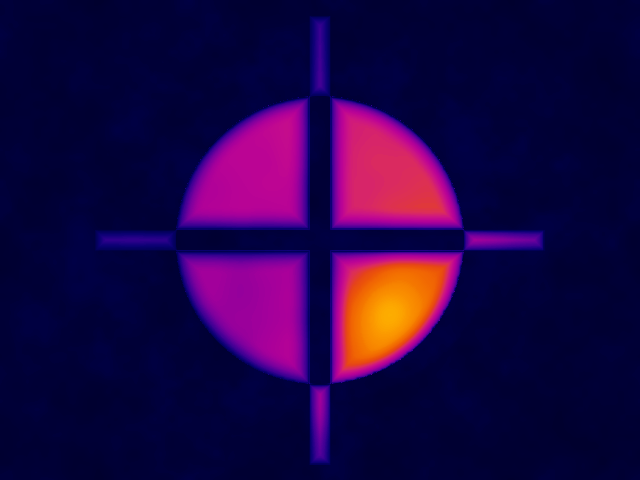
The Optris symbol, extruded and radiating, on a seamless eight-second loop. Built to be left running on a screen.
optris::sdk::SimulatedConfig cfg;
cfg.pattern = optris::sdk::TestPattern::kLogoRadiant;
cfg.temp_min_c = 20.0f;
cfg.temp_max_c = 65.0f;
optris_sdk_simulated_config cfg;
optris_sdk_simulated_config_init(&cfg, sizeof(cfg));
cfg.pattern = OPTRIS_SDK_PATTERN_LOGO_RADIANT;
cfg.temp_min_c = 20.0F;
cfg.temp_max_c = 65.0F;
var logo = new SimulatedCameraOptions
{
    Pattern = TestPattern.LogoRadiant,
    MinTemperature = 20.0f,
    MaxTemperature = 65.0f,
};
config = optris_sdk.SimulatedCamera(
    pattern=optris_sdk.PATTERN_LOGO_RADIANT,
    temp_min_c=20.0, temp_max_c=65.0)
let cfg = SimulatedConfig::new()
    .pattern(TestPattern::LogoRadiant)
    .temperature_range(20.0, 65.0);
What it is doing:
- The mark's geometry is analytic, derived from the brand SVG (
docs/img/optris-symbol.svg): a disc with a cross-shaped gap cut out of it, and the cross continuing outside the disc as four arms. It is exact at every output size, with no bitmap to resample. - The mark is eight separate pieces of metal: four petals and four arms, none of them touching. A contact patch orbits the ring, and heat conducts through whichever piece it is over and stops at the gaps, because there is air there. What crosses the gaps is radiation, modelled separately and much weaker.
- The heat is a real solve, not a brightness ramp: conduction masked to the material, a moving source, and Newton cooling back to the room, integrated on a grid in the mark's own coordinates. Three loop periods are integrated before the one that is kept, which is what makes the loop close exactly rather than nearly.
- It reads as an object at a temperature, not as a bright spot travelling over one. The cooling time constant is 3.65 s against the 8 s loop, so a piece is still at about half the warmth it reached when the patch is on the far side of the ring, and a quarter of it just before the patch comes back; the mark as a whole settles at about a third of the frame's peak rather than falling back to the room between visits. The patch is wide enough that its heat has spread across a good part of a petal by the time it is visible.
- The bevelled edges read cooler than the flat face, for two real reasons. The metal under a round-over is thinner and loses heat faster, so it genuinely sits nearer the room; and it turns away from the lens, so emissivity falls and part of what comes back is the room reflected off it. That second effect is the trap that catches people measuring a curved surface off-axis.
The whole loop, as eight frames a second apart: img/sim-scenes/logo_loop/. Watch one petal rather than the bright patch.
Loop period 8 s: frame N and frame N + 8 s are byte-identical. The heat table is built once per process, on the first frame that needs it.
CircuitBoard
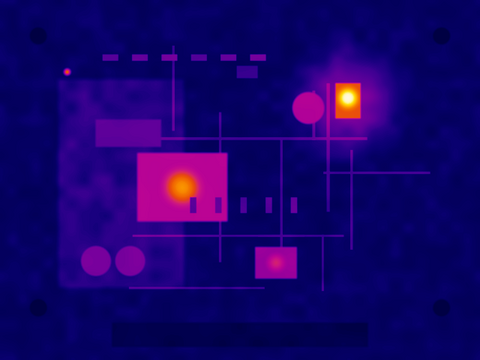
Populated electronics on a cool laminate.
optris::sdk::SimulatedConfig cfg;
cfg.pattern = optris::sdk::TestPattern::kCircuitBoard;
cfg.temp_min_c = 22.0f;
cfg.temp_max_c = 95.0f;
optris_sdk_simulated_config cfg;
optris_sdk_simulated_config_init(&cfg, sizeof(cfg));
cfg.pattern = OPTRIS_SDK_PATTERN_CIRCUIT_BOARD;
cfg.temp_min_c = 22.0F;
cfg.temp_max_c = 95.0F;
var board = new SimulatedCameraOptions
{
    Pattern = TestPattern.CircuitBoard,
    MinTemperature = 22.0f,
    MaxTemperature = 95.0f,
};
config = optris_sdk.SimulatedCamera(
    pattern=optris_sdk.PATTERN_CIRCUIT_BOARD,
    temp_min_c=22.0, temp_max_c=95.0)
let cfg = SimulatedConfig::new()
    .pattern(TestPattern::CircuitBoard)
    .temperature_range(22.0, 95.0);
A processor whose die heats and cools under a workload cycle; copper pours and traces warm from the current they carry; a linear regulator that is the hottest thing on the board by a distance, with its heat spreading into the copper around it and cooking the electrolytic capacitor next to it. A plastic edge connector and four plated mounting holes are the coolest things in the frame.
SteamPipe
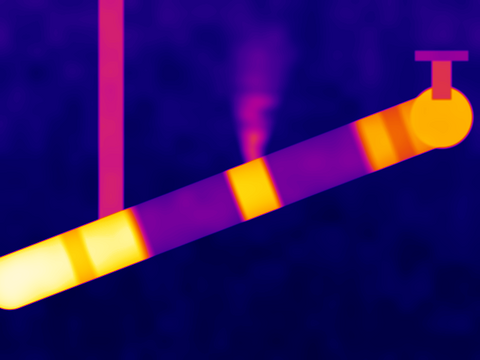
A steam line with a tear in its lagging.
optris::sdk::SimulatedConfig cfg;
cfg.pattern = optris::sdk::TestPattern::kSteamPipe;
cfg.temp_min_c = 15.0f;
cfg.temp_max_c = 180.0f;
optris_sdk_simulated_config cfg;
optris_sdk_simulated_config_init(&cfg, sizeof(cfg));
cfg.pattern = OPTRIS_SDK_PATTERN_STEAM_PIPE;
cfg.temp_min_c = 15.0F;
cfg.temp_max_c = 180.0F;
var pipe = new SimulatedCameraOptions
{
    Pattern = TestPattern.SteamPipe,
    MinTemperature = 15.0f,
    MaxTemperature = 180.0f,
};
config = optris_sdk.SimulatedCamera(
    pattern=optris_sdk.PATTERN_STEAM_PIPE,
    temp_min_c=15.0, temp_max_c=180.0)
let cfg = SimulatedConfig::new()
    .pattern(TestPattern::SteamPipe)
    .temperature_range(15.0, 180.0);
Hot at the inlet and cooling downstream, with a jacketed section that reads cool and a breach in the jacket that reads hot, and a convection plume rising out of it. The flanges show as cool bands, and the bolted hanger is a thermal bridge: cooler than the line it holds, warmer than the wall behind. The pipe reads coolest at its silhouette, which is the classic way to under-read a pipe by fifty degrees.
RotatingMachine
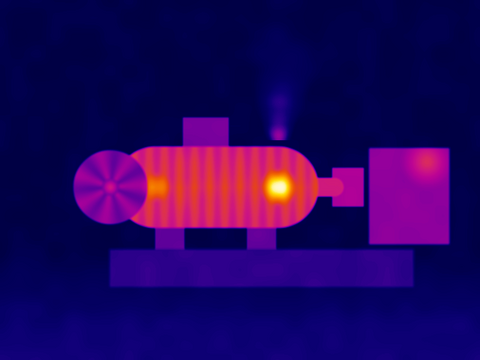
An electric motor driving a gearbox.
optris::sdk::SimulatedConfig cfg;
cfg.pattern = optris::sdk::TestPattern::kRotatingMachine;
cfg.temp_min_c = 18.0f;
cfg.temp_max_c = 85.0f;
optris_sdk_simulated_config cfg;
optris_sdk_simulated_config_init(&cfg, sizeof(cfg));
cfg.pattern = OPTRIS_SDK_PATTERN_ROTATING_MACHINE;
cfg.temp_min_c = 18.0F;
cfg.temp_max_c = 85.0F;
var machine = new SimulatedCameraOptions
{
    Pattern = TestPattern.RotatingMachine,
    MinTemperature = 18.0f,
    MaxTemperature = 85.0f,
};
config = optris_sdk.SimulatedCamera(
    pattern=optris_sdk.PATTERN_ROTATING_MACHINE,
    temp_min_c=18.0, temp_max_c=85.0)
let cfg = SimulatedConfig::new()
    .pattern(TestPattern::RotatingMachine)
    .temperature_range(18.0, 85.0);
Cooling fins along the frame, a turning fan behind its cowl, and a drive-end bearing running hot, with a healthy bearing at the other end to compare it against, which is how the call is actually made. A plume off the hot bearing, a warm plinth under the feet, and a gearbox with one warm corner.
Deterministic Output
The only pattern that uses randomness is kNoise, driven by seed. With a non-zero seed (the default is 1) two simulated imagers with the same SimulatedConfig produce byte-identical frame sequences, and so does the same program run twice. The other patterns do not depend on the seed:
#include <optrissdk.h>
#include <chrono>
#include <map>
#include <mutex>
#include <print>
#include <thread>
#include <vector>

// Frames keyed by sequence number, so the comparison lines up frame N
// of one camera with frame N of the other even if a pull missed one.
struct Capture {
  std::mutex mutex;
  std::map<uint32_t, std::vector<int16_t>> frames;
};

int main() {
  optris::sdk::SimulatedConfig cfg;
  cfg.width = 80;
  cfg.height = 60;
  cfg.framerate = 30;
  cfg.pattern = optris::sdk::TestPattern::kNoise;
  cfg.seed = 42;

  auto imager_a = optris::sdk::Imager::Create(cfg);
  auto imager_b = optris::sdk::Imager::Create(cfg);

  Capture a, b;
  auto record = [](Capture& c) {
    return [&c](const optris::sdk::ThermalFrame& f) {
      std::lock_guard lock(c.mutex);
      c.frames[f.GetMetadata().sequence].assign(
          f.GetData(), f.GetData() + f.GetDataSize());
    };
  };
  imager_a->SetThermalCallback(record(a));
  imager_b->SetThermalCallback(record(b));

  imager_a->Start();
  imager_b->Start();
  std::this_thread::sleep_for(std::chrono::seconds(2));
  imager_a->Stop();
  imager_b->Stop();

  size_t compared = 0;
  for (const auto& [sequence, pixels] : a.frames) {
    auto other = b.frames.find(sequence);
    if (other == b.frames.end()) continue;
    if (other->second != pixels) {
      std::println("frame {} differs", sequence);
      return 1;
    }
    ++compared;
  }

  std::println("{} frames compared: all identical.", compared);
}
/* The same configuration, twice. A non-zero seed (1 by default) makes
 * two cameras with the same optris_sdk_simulated_config produce
 * byte-identical frame sequences; seed 0 draws a fresh one. */
optris_sdk_simulated_config cfg;
optris_sdk_imager *first = NULL;
optris_sdk_imager *second = NULL;

optris_sdk_simulated_config_init(&cfg, sizeof(cfg));
cfg.width = 80;
cfg.height = 60;
cfg.framerate = 30;
cfg.pattern = OPTRIS_SDK_PATTERN_NOISE;
cfg.seed = 42;

optris_sdk_imager_create_simulated(&cfg, &first);
optris_sdk_imager_create_simulated(&cfg, &second);
/* Key each capture by its sequence number, so the comparison lines up
 * frame N of one camera with frame N of the other even if a pull
 * missed one. */
// The same configuration, twice.
var deterministic = new SimulatedCameraOptions
{
    Width = 80,
    Height = 60,
    FrameRate = 30,
    Pattern = TestPattern.Noise,
    Seed = 42,
};

await using ThermalCamera first = ThermalCamera.OpenSimulated(deterministic);
await using ThermalCamera second = ThermalCamera.OpenSimulated(deterministic);
first.Start();
second.Start();

float[] a = new float[80 * 60];
float[] b = new float[80 * 60];
ThermalFrame fa = await first.AcquireFrameAsync(TimeSpan.FromSeconds(15));
ThermalFrame fb = await second.AcquireFrameAsync(TimeSpan.FromSeconds(15));
// Line the two streams up first. `Sequence` is monotonic within ONE
// camera, so it is not a shared clock: the cameras were started a
// moment apart and the first frame out of each is not the same frame.
while (fa.Metadata.Sequence != fb.Metadata.Sequence)
{
    if (fa.Metadata.Sequence < fb.Metadata.Sequence)
    {
        fa.Dispose();
        fa = await first.AcquireFrameAsync(TimeSpan.FromSeconds(15));
    }
    else
    {
        fb.Dispose();
        fb = await second.AcquireFrameAsync(TimeSpan.FromSeconds(15));
    }
}
using (fa)
using (fb)
{
    fa.CopyTemperaturesTo(a);
    fb.CopyTemperaturesTo(b);
    Console.WriteLine(a.AsSpan().SequenceEqual(b)
        ? "identical" : "DIVERGED");
}

first.Stop();
second.Stop();
# The same configuration, twice.
deterministic = optris_sdk.SimulatedCamera(
    width=80, height=60, framerate=30,
    pattern=optris_sdk.PATTERN_NOISE, seed=42)

with optris_sdk.Camera.simulated(deterministic) as first, \
        optris_sdk.Camera.simulated(deterministic) as second:
    first.start()
    second.start()
    fa = first.acquire(15000)
    fb = second.acquire(15000)
    # Line the two streams up first. `sequence` is monotonic within
    # ONE camera, so it is not a shared clock: the cameras were
    # started a moment apart and the first frame out of each is not
    # the same frame. Comparing them unaligned compares two different
    # frames and says nothing about determinism.
    while fa.sequence != fb.sequence:
        if fa.sequence < fb.sequence:
            fa = first.acquire(15000)
        else:
            fb = second.acquire(15000)
    # `list()` on both sides, and it is not decoration. `temperatures()`
    # hands back a ctypes array, and `==` between two of those compares
    # the objects rather than their contents -- it is False for any two
    # distinct arrays, so the plain comparison printed DIVERGED for two
    # frames that were equal in all 4,800 pixels. `list()` makes it an
    # element-by-element comparison. The C# and Rust tabs below need no
    # such step: `Span.SequenceEqual` and `Vec<f32> == Vec<f32>` already
    # compare contents.
    same = list(fa.temperatures()) == list(fb.temperatures())
    print('identical' if same else 'DIVERGED')
    assert same, 'the same seed and pattern must give the same frame'
    first.stop()
    second.stop()
// The same configuration, twice.
let deterministic = SimulatedConfig::new()
    .resolution(80, 60)
    .framerate(30)
    .pattern(TestPattern::Noise)
    .seed(42);

let mut first = Camera::simulated(&deterministic)?;
let mut second = Camera::simulated(&deterministic)?;
first.start()?;
second.start()?;

let mut fa = first.acquire_frame(15000)?.expect("a frame");
let mut fb = second.acquire_frame(15000)?.expect("a frame");
// Line the two streams up first. `sequence` is monotonic within ONE
// camera, so it is not a shared clock: the cameras were started a
// moment apart and the first frame out of each is not the same frame.
while fa.info()?.sequence != fb.info()?.sequence {
    if fa.info()?.sequence < fb.info()?.sequence {
        fa = first.acquire_frame(15000)?.expect("a frame");
    } else {
        fb = second.acquire_frame(15000)?.expect("a frame");
    }
}
println!("{}", if fa.temperatures()? == fb.temperatures()? {
    "identical"
} else {
    "DIVERGED"
});

first.stop()?;
second.stop()?;
Setting seed = 0 makes kNoise draw a fresh seed when the camera is created, producing different output each run.
Simulated Flag Cycles
Real cameras periodically close the shutter flag for recalibration. The simulated imager replicates it:
optris::sdk::SimulatedConfig cfg;
cfg.flag_interval_s = 30.0f;   // Flag every 30 seconds
cfg.flag_duration_s = 0.5f;    // Flag stays closed for 0.5s
optris_sdk_simulated_config cfg;
optris_sdk_simulated_config_init(&cfg, sizeof(cfg));
cfg.flag_interval_s = 30.0F;   /* Flag every 30 seconds */
cfg.flag_duration_s = 0.5F;    /* Flag stays closed for 0.5s */
var flagging = new SimulatedCameraOptions
{
    // TimeSpan rather than float seconds, so neither end can be read
    // as the wrong unit.
    FlagInterval = TimeSpan.FromSeconds(30),
    FlagDuration = TimeSpan.FromSeconds(0.5),
};
config = optris_sdk.SimulatedCamera(flag_interval_s=30.0,
                                    flag_duration_s=0.5)
// One call for the pair: an interval with no duration is not a cycle.
let cfg = SimulatedConfig::new().flag_cycle(30.0, 0.5);
A simulated flag cycle raises SetShutterCallback() through the same Closing → Closed → Opening → Open sequence a real camera does, so a shutter display can be tested without a camera.
The virtual camera keeps delivering frames while its flag is closed, with FrameMetadata::flag_open set to false, and so does a real one. Since version 12 the SDK holds the last frame taken with the shutter open and delivers that through the closed window, on every source, so the stream stays continuous and flag_open is false on those frames on hardware too. Code that tracks the shutter from the frame flag behaves the same against both.
The one difference left is the one to test against: on a simulated camera the held frames are not marked FrameMetadata::is_repeated_frame, so nothing in the frame tells them apart from new ones.
Set flag_interval_s = 0 to disable flag cycles (the default).
The frames delivered through a flag cycle are not new pictures: on the default calibration, and on any camera from 8 x 8 up (the smallest the pipeline runs on), the pipeline hands out the frame taken just before the closure while the flag is closed and for seven frames after it opens, whatever the pattern. FrameCycle shows that as one step held across the window.
Changing the Scene While Running
A running simulated camera can be pointed at a different scene without reconnecting. Regions, alarm rules, a running recording and every open handle survive the change, which takes effect on the next frame:
auto scene = imager->GetSimulatedOptions();
scene.pattern = optris::sdk::TestPattern::kHotSpot;
scene.temp_max_c = 120.0f;
imager->UpdateSimulatedScene(scene);
optris_sdk_simulated_config scene;

/* Read the running config back rather than building one: the identity
 * and geometry fields have to match what the camera was opened with,
 * and this is how they do. */
optris_sdk_simulated_config_init(&scene, sizeof(scene));
optris_sdk_imager_get_simulated_config(imager, &scene);
scene.pattern = OPTRIS_SDK_PATTERN_HOT_SPOT;
scene.temp_max_c = 120.0F;
optris_sdk_imager_update_simulated_scene(imager, &scene);
SimulatedCameraOptions scene = camera.SimulatedOptions;
scene.Pattern = TestPattern.HotSpot;
scene.MaxTemperature = 120.0f;
camera.UpdateSimulatedScene(scene);
scene = camera.simulated_config
scene.pattern = optris_sdk.PATTERN_HOT_SPOT
scene.temp_max_c = 120.0
camera.update_simulated_scene(scene)
// The builder methods take `self` by value, so read the one field
// that is being kept out before handing the config on.
let scene = camera.simulated_config()?;
let (low, _) = scene.temperatures_c();
let scene = scene
    .pattern(TestPattern::HotSpot)
    .temperature_range(low, 120.0);
camera.update_simulated_scene(&scene)?;
Only scene fields can change: pattern, gradient_direction, temp_min_c, temp_max_c, flag_interval_s, flag_duration_s, checker_size, hotspot_radius, hotspot_speed, hotspot_position and frame_cycle_steps. The identity and geometry fields (device_type, width, height, framerate, serial, seed, frame_file_path) are fixed once the camera is open: UpdateSimulatedScene() throws ConfigException naming the field if one differs from the running value. Switching to kFromFile on a camera created without a frame file is refused the same way. Both calls throw FeatureNotSupportedException on a real camera; IsSimulated() asks without throwing.
A Radiometric Detector
A simulated camera runs the real pipeline either way. What raw_detector switches is which calibration it runs through, and that decides what the pipeline can be used to measure.
By default the camera runs on the synthetic identity calibration described in synthetic_calibration.h: unity gain, a straight-line characteristic curve, a flat field that is flat. Every stage executes and costs what it costs on a real frame, so noise filters and detail enhancement behave as they do on hardware, but the scene comes back bit-exact across the interior because nothing in that calibration alters a pixel. The header describes itself as not radiometrically meaningful.
SimulatedConfig::raw_detector gives the camera a calibration with physics in it instead: a plausible characteristic curve, a cos^4 flat field, per-pixel gain and offset spread, a scatter of dead pixels, and an optic in front of it. The scene is then treated as a radiance field rather than as an answer: projected through that optic, composed forwards exactly as apply_emissivity() takes it back out, and inverted into the ADU a detector would have produced.
#include <optrissdk.h>

optris::sdk::SimulatedConfig cfg;
cfg.device_type = optris::sdk::DeviceType::kPi640I;
cfg.width = 640;
cfg.height = 480;
cfg.pattern = optris::sdk::TestPattern::kSteamPipe;

// Give it a detector with physics in it.
cfg.raw_detector.enabled = true;
// Empty: write a synthetic calibration and use it. Point this at a
// real calibration directory to use real calibration data instead.
cfg.raw_detector.calibration_dir = "";
// Give the correction something to correct.
cfg.raw_detector.correct_distortion = true;

auto imager = optris::sdk::Imager::Create(cfg);
imager->Start();
auto frame = imager->AcquireFrame();
imager->Stop();
optris_sdk_simulated_config cfg;
optris_sdk_imager *radiometric = NULL;
optris_sdk_frame *measured = NULL;

optris_sdk_simulated_config_init(&cfg, sizeof(cfg));
cfg.width = 640;
cfg.height = 480;
cfg.pattern = OPTRIS_SDK_PATTERN_STEAM_PIPE;

/* Give it a detector with physics in it. */
cfg.raw_detector.enabled = true;
/* Empty: write a synthetic calibration and use it. Point this at a
 * real calibration directory to use real calibration data instead. */
cfg.raw_detector.calibration_dir[0] = '\0';
/* Give the correction something to correct. */
cfg.raw_detector.correct_distortion = true;

optris_sdk_imager_create_simulated(&cfg, &radiometric);
optris_sdk_imager_start(radiometric);
optris_sdk_imager_acquire_frame(radiometric, 15000, &measured);
optris_sdk_frame_free(measured);
optris_sdk_imager_stop(radiometric);
optris_sdk_imager_destroy(radiometric);
The frame that comes back is the scene as that camera would have measured it, not as the generator drew it: it carries the optic's distortion (corrected, if correct_distortion), the flat field's vignetting (corrected), the calibration's dead pixels, and the quantisation of the detector's counts and the temperature encoding. Measured on a 640x480 steam-pipe scene, 241 786 of 307 200 pixels differ from what the identity calibration returns for the same scene. SimulatedRawMode.TheRadiometricPathChangesThePicture asserts that and prints the count.
The cost is that the picture no longer equals the scene, which is why it is not the default.
What it needs. A calibration. With calibration_dir empty the SDK writes one into a temporary directory, named with a fingerprint of everything it depends on, and reads it back through the ordinary loaders. It calibrates nothing and must not be used to judge absolute accuracy; it gives every stage something structured to work on. Naming a real calibration directory uses that instead.
A camera that cannot build it refuses to open rather than falling back. The fallback would be the identity calibration, which delivers a believable picture that measures nothing and reports success doing it. SimulatedRawMode.RefusesToOpenWithoutAUsableCalibration holds that line.
Detail enhancement does not reach the picture in this mode. It is a display-only pass written by the pipeline backend, and this path runs pl::process() directly rather than through a backend. The temperatures are unaffected.
The scene is what the object really is; the radiation settings are what the camera assumes. The scene is composed with the radiation in force when the camera opened: emissivity 1.0, transmissivity 1.0 and a 20 C room unless something was set before that. Every frame is then measured with the radiation set now, so an emissivity, transmissivity or ambient changed after opening moves the reading the way it does on a real camera. On a uniform 50 C scene, an emissivity of 0.95 reads 51.3 C and 0.75 reads 58.5 C: a lower setting attributes part of the radiance to reflection, so the object must be hotter to make up the rest.
A region's own emissivity reaches its readings here too, in both emissivity modes, and never the picture. This path has no image-side emissivity map, so such a region reports RegionEmissivityState::kReadingOnly and Radiometry::RegionEmissivityInFrames() answers false, as on a recording or a still. On the same scene a region at 0.6 reads 66.5 C whatever the camera's emissivity is set to. Radiometry::TemperatureAtEmissivity() answers from the same curve. RadiometricSimulatedCamera.* in test_region_emissivity_mode.cc measures all three.
To measure rather than just run it, use otc_virtual; see Command-Line Tools. It prints a pass ledger whose per-stage counts are measured by re-running the frame with one stage switched off, and measures the distortion correction against a Zemax prediction for the optic.
Configuration Options
Complete reference for SimulatedConfig:
| Field | Type | Default | Description |
|---|---|---|---|
device_type |
DeviceType |
kPi160 |
Simulated device type. Determines default resolution when width/height are 0. |
width |
uint32_t | 0 | Frame width in pixels. 0 = use device type default. |
height |
uint32_t | 0 | Frame height in pixels. 0 = use device type default. |
framerate |
uint32_t | 32 | Frame rate in Hz. |
pattern |
TestPattern |
kGradient |
Test pattern or scene to generate. |
gradient_direction |
GradientDirection |
kHorizontal |
Direction for kGradient pattern. |
temp_min_c |
float | 20.0 | Minimum temperature for pattern generation. |
temp_max_c |
float | 40.0 | Maximum temperature for pattern generation. |
serial |
string | "9990001" | Simulated serial number. |
seed |
uint64_t | 1 | RNG seed for deterministic output. 0 = random. |
flag_interval_s |
float | 0.0 | Flag cycle interval in seconds. 0 = no flag cycles. |
flag_duration_s |
float | 0.5 | Flag close duration in seconds. |
checker_size |
uint32_t | 8 | Checkerboard block size in pixels. |
hotspot_radius |
uint32_t | 10 | Hot spot radius in pixels. |
hotspot_speed |
float | 20.0 | How fast the hot spot travels its path. Not pixels per second, see HotSpot. Ignored while hotspot_position is set. |
hotspot_position |
std::optional<std::array<float, 2>> |
empty | Where to pin the hot spot, in frame-normalized isotropic coordinates. Empty lets it move on its own. |
frame_cycle_steps |
uint32_t | 4 | How many temperatures kFrameCycle steps through, 2 to 8. 0 = the default. |
frame_file_path |
string | "" | File path for kFromFile pattern. |
Fixed once the camera is open: device_type, width, height, framerate, serial, seed, frame_file_path. The rest can be changed with UpdateSimulatedScene().
Device Enumeration
A camera created with Imager::Create(SimulatedConfig) exists only as that handle: it is not enumerated and no device watcher reports it. Register it with RegisterSimulatedDevice() to put it in the device list. Enumeration with include_simulated set lists every registered simulated device, with ConnectionType::kSimulated; with none registered, it lists one built-in PI 160 on serial 9990001. Imager::Create(DeviceInfo) on a registered entry opens it with the scene it was registered with.
Registering a config with a non-empty serial that is already registered throws ConfigException. SimulatedConfig::serial defaults to "9990001", so clear it to have serials assigned from 9990001 upwards when registering more than one. UnregisterSimulatedDevice() removes a list entry without closing a camera already opened from it.
#include <optrissdk.h>
#include <print>

int main() {
  optris::sdk::SimulatedConfig scene;
  scene.serial.clear();  // assign one
  scene.pattern = optris::sdk::TestPattern::kHotSpot;
  optris::sdk::RegisterSimulatedDevice(scene);

  optris::sdk::EnumerationOptions opts;
  opts.include_simulated = true;

  auto devices = optris::sdk::EnumerateDevices(opts);

  for (const auto& d : devices) {
    std::println("{} (S/N {}, {})",
                 optris::sdk::DeviceTypeToString(d.type),
                 d.serial,
                 optris::sdk::ConnectionTypeToString(
                     d.connection));
  }

  // Find the simulated device.
  for (const auto& d : devices) {
    if (d.connection ==
        optris::sdk::ConnectionType::kSimulated) {
      auto imager = optris::sdk::Imager::Create(d);
      std::println("Created imager from enumerated device: {}",
                   imager->GetDeviceInfo().serial);
      break;
    }
  }
}
optris_sdk_simulated_config scene;
optris_sdk_enumeration_options options;
optris_sdk_device_info devices[16];
optris_sdk_imager *opened = NULL;
size_t count = 0;
size_t i = 0;

optris_sdk_simulated_config_init(&scene, sizeof(scene));
scene.serial[0] = '\0';   /* assign one */
scene.pattern = OPTRIS_SDK_PATTERN_HOT_SPOT;
optris_sdk_register_simulated_device(&scene, NULL);

optris_sdk_enumeration_options_init(&options, sizeof(options));
options.include_simulated = 1;
for (i = 0; i < 16; ++i) {
  optris_sdk_device_info_init(&devices[i], sizeof(devices[i]));
}
optris_sdk_enumerate_devices(&options, devices, 16, sizeof devices[0],
                             &count);

for (i = 0; i < count && i < 16; ++i) {
  printf("%s (S/N %s)\n", devices[i].model, devices[i].serial);
  if (devices[i].connection == OPTRIS_SDK_CONNECTION_SIMULATED &&
      opened == NULL) {
    optris_sdk_imager_create_from_device(&devices[i], &opened);
  }
}
optris_sdk_imager_destroy(opened);
var scene = new SimulatedCameraOptions
{
    Serial = string.Empty,   // assign one
    Pattern = TestPattern.HotSpot,
};
DeviceInfo registered = Sdk.RegisterSimulatedDevice(scene);

foreach (DeviceInfo d in Sdk.EnumerateDevices(
             new Optris.Sdk.EnumerationOptions { IncludeSimulated = true }))
{
    Console.WriteLine($"{d.Model} (S/N {d.Serial}, {d.Connection})");
    if (d.Connection == ConnectionType.Simulated)
    {
        await using ThermalCamera fromList = ThermalCamera.Open(d);
        Console.WriteLine($"Opened from the device list: {fromList.Serial}");
        break;
    }
}
scene = optris_sdk.SimulatedCamera(serial='',   # assign one
                                   pattern=optris_sdk.PATTERN_HOT_SPOT)
registered = optris_sdk.register_simulated_device(scene)

options = optris_sdk.EnumerationOptions(include_simulated=True)
for d in optris_sdk.enumerate_devices(options):
    print(f'{d.model} (S/N {d.serial}, '
          f'{optris_sdk.connection_name(d.connection)})')
    if d.connection == optris_sdk.CONNECTION_SIMULATED:
        with optris_sdk.Camera.open(d) as from_list:
            print('Opened from the device list:', from_list.serial)
        break
let scene = SimulatedConfig::new()
    .serial("")?                       // assign one
    .pattern(TestPattern::HotSpot);
let registered = optris_sdk::simulated::register_simulated_device(&scene)?;

let options = EnumerationOptions::new().include_simulated(true);
for d in enumerate_with(&options)? {
    println!("{} (S/N {}, {:?})", d.model, d.serial, d.connection);
    if d.connection == ConnectionType::Simulated {
        let from_list = Camera::open_device(&d)?;
        println!("Opened from the device list: {}", from_list.serial()?);
        break;
    }
}
Use Cases
Unit Testing
#include <gtest/gtest.h>

#include <optrissdk.h>

TEST(SimulatedImager, ProcessesGradientFrames) {
  optris::sdk::SimulatedConfig cfg;
  cfg.width = 80;
  cfg.height = 60;
  cfg.pattern = optris::sdk::TestPattern::kGradient;
  cfg.temp_min_c = 20.0f;
  cfg.temp_max_c = 80.0f;

  auto imager = optris::sdk::Imager::Create(cfg);

  imager->Start();
  auto frame = imager->AcquireFrame();
  imager->Stop();

  EXPECT_GE(frame.GetMaxTemperature(), 70.0f);
  EXPECT_LE(frame.GetMinTemperature(), 30.0f);
}
[Fact]
public async Task ProcessesGradientFrames()
{
    await using ThermalCamera camera = ThermalCamera.OpenSimulated(
        new SimulatedCameraOptions
        {
            Width = 80,
            Height = 60,
            Pattern = TestPattern.Gradient,
            MinTemperature = 20.0f,
            MaxTemperature = 80.0f,
        });

    camera.Start();
    using ThermalFrame frame =
        await camera.AcquireFrameAsync(TimeSpan.FromSeconds(15));
    camera.Stop();

    Assert.True(frame.MaxTemperature >= 70.0f);
    Assert.True(frame.MinTemperature <= 30.0f);
}
# unittest is in the standard library, so this needs nothing installed.
import unittest
import optris_sdk

class SimulatedImager(unittest.TestCase):
    def test_processes_gradient_frames(self):
        config = optris_sdk.SimulatedCamera(
            width=80, height=60,
            pattern=optris_sdk.PATTERN_GRADIENT,
            temp_min_c=20.0, temp_max_c=80.0)

        with optris_sdk.Camera.simulated(config) as camera:
            camera.start()
            frame = camera.acquire(15000)
            camera.stop()

        self.assertGreaterEqual(frame.max_c, 70.0)
        self.assertLessEqual(frame.min_c, 30.0)

unittest.main(argv=['-'], exit=False)
// #[test] is built into the language, so this needs nothing installed.
#[test]
fn processes_gradient_frames() -> optris_sdk::Result<()> {
    let cfg = SimulatedConfig::new()
        .resolution(80, 60)
        .pattern(TestPattern::Gradient)
        .temperature_range(20.0, 80.0);

    let mut camera = Camera::simulated(&cfg)?;
    camera.start()?;
    let frame = camera.acquire_frame(15000)?.expect("a frame");
    let info = frame.info()?;
    camera.stop()?;

    assert!(info.max_temp_c >= 70.0);
    assert!(info.min_temp_c <= 30.0);
    Ok(())
}
CI/CD Pipeline
Simulated imagers require no USB devices, no calibration downloads and no network access.
Examples
All Patterns
#include <optrissdk.h>
#include <print>
#include <thread>

void test_pattern(optris::sdk::TestPattern pattern,
                  const char* name) {
  optris::sdk::SimulatedConfig cfg;
  cfg.width = 160;
  cfg.height = 120;
  cfg.framerate = 30;
  cfg.pattern = pattern;
  cfg.temp_min_c = 20.0f;
  cfg.temp_max_c = 80.0f;
  cfg.seed = 42;

  auto imager = optris::sdk::Imager::Create(cfg);
  imager->Start();

  auto frame = imager->AcquireFrame();

  std::println("{}: {}x{} min={:.1f} max={:.1f}",
               name,
               frame.GetWidth(), frame.GetHeight(),
               frame.GetMinTemperature(),
               frame.GetMaxTemperature());

  imager->Stop();
}

int main() {
  using P = optris::sdk::TestPattern;
  test_pattern(P::kGradient, "Gradient");
  test_pattern(P::kUniform, "Uniform");
  test_pattern(P::kHotSpot, "HotSpot");
  test_pattern(P::kCheckerboard, "Checkerboard");
  test_pattern(P::kNoise, "Noise");
  test_pattern(P::kFrameCycle, "FrameCycle");
}
#include "optris/sdk_c.h"
#include <stdio.h>

static void TestPattern(optris_sdk_test_pattern pattern, const char *name) {
  optris_sdk_simulated_config cfg;
  optris_sdk_imager *imager = NULL;
  optris_sdk_frame *frame = NULL;
  optris_sdk_frame_info info;

  optris_sdk_simulated_config_init(&cfg, sizeof(cfg));
  cfg.width = 160;
  cfg.height = 120;
  cfg.framerate = 30;
  cfg.pattern = pattern;
  cfg.temp_min_c = 20.0F;
  cfg.temp_max_c = 80.0F;
  cfg.seed = 42;

  optris_sdk_imager_create_simulated(&cfg, &imager);
  optris_sdk_imager_start(imager);
  if (optris_sdk_imager_acquire_frame(imager, 15000, &frame) ==
      OPTRIS_SDK_OK) {
    optris_sdk_frame_info_init(&info, sizeof(info));
    optris_sdk_frame_get_info(frame, &info);
    printf("%s: %ux%u min=%.1f max=%.1f\n", name, (unsigned)info.width,
           (unsigned)info.height, (double)info.min_temp_c,
           (double)info.max_temp_c);
    optris_sdk_frame_free(frame);
  }
  optris_sdk_imager_stop(imager);
  optris_sdk_imager_destroy(imager);
}

int main(void) {
  TestPattern(OPTRIS_SDK_PATTERN_GRADIENT, "Gradient");
  TestPattern(OPTRIS_SDK_PATTERN_UNIFORM, "Uniform");
  TestPattern(OPTRIS_SDK_PATTERN_HOT_SPOT, "HotSpot");
  TestPattern(OPTRIS_SDK_PATTERN_CHECKERBOARD, "Checkerboard");
  TestPattern(OPTRIS_SDK_PATTERN_NOISE, "Noise");
  TestPattern(OPTRIS_SDK_PATTERN_FRAME_CYCLE, "FrameCycle");
  return 0;
}
static async Task ShowPattern(TestPattern pattern, string name)
{
    await using ThermalCamera camera = ThermalCamera.OpenSimulated(
        new SimulatedCameraOptions
        {
            Width = 160,
            Height = 120,
            FrameRate = 30,
            Pattern = pattern,
            MinTemperature = 20.0f,
            MaxTemperature = 80.0f,
            Seed = 42,
        });

    camera.Start();
    using ThermalFrame shown =
        await camera.AcquireFrameAsync(TimeSpan.FromSeconds(15));
    Console.WriteLine($"{name}: {shown.Width}x{shown.Height} " +
                      $"min={shown.MinTemperature:F1} " +
                      $"max={shown.MaxTemperature:F1}");
    camera.Stop();
}

foreach ((TestPattern pattern, string name) in new[]
         {
             (TestPattern.Gradient, "Gradient"),
             (TestPattern.Uniform, "Uniform"),
             (TestPattern.HotSpot, "HotSpot"),
             (TestPattern.Checkerboard, "Checkerboard"),
             (TestPattern.Noise, "Noise"),
             (TestPattern.FrameCycle, "FrameCycle"),
         })
{
    await ShowPattern(pattern, name);
}
def show_pattern(pattern, name):
    config = optris_sdk.SimulatedCamera(width=160, height=120,
                                        framerate=30, pattern=pattern,
                                        temp_min_c=20.0,
                                        temp_max_c=80.0, seed=42)
    with optris_sdk.Camera.simulated(config) as camera:
        camera.start()
        shown = camera.acquire(15000)
        print(f'{name}: {shown.width}x{shown.height} '
              f'min={shown.min_c:.1f} max={shown.max_c:.1f}')
        camera.stop()

for pattern, name in [
    (optris_sdk.PATTERN_GRADIENT, 'Gradient'),
    (optris_sdk.PATTERN_UNIFORM, 'Uniform'),
    (optris_sdk.PATTERN_HOT_SPOT, 'HotSpot'),
    (optris_sdk.PATTERN_CHECKERBOARD, 'Checkerboard'),
    (optris_sdk.PATTERN_NOISE, 'Noise'),
    (optris_sdk.PATTERN_FRAME_CYCLE, 'FrameCycle'),
]:
    show_pattern(pattern, name)
fn show_pattern(pattern: TestPattern, name: &str) -> optris_sdk::Result<()> {
    let cfg = SimulatedConfig::new()
        .resolution(160, 120)
        .framerate(30)
        .pattern(pattern)
        .temperature_range(20.0, 80.0)
        .seed(42);

    let mut camera = Camera::simulated(&cfg)?;
    camera.start()?;
    if let Some(shown) = camera.acquire_frame(15000)? {
        let shown_info = shown.info()?;
        println!("{name}: {}x{} min={:.1} max={:.1}", shown_info.width,
                 shown_info.height, shown_info.min_temp_c,
                 shown_info.max_temp_c);
    }
    camera.stop()
}

for (pattern, name) in [
    (TestPattern::Gradient, "Gradient"),
    (TestPattern::Uniform, "Uniform"),
    (TestPattern::HotSpot, "HotSpot"),
    (TestPattern::Checkerboard, "Checkerboard"),
    (TestPattern::Noise, "Noise"),
    (TestPattern::FrameCycle, "FrameCycle"),
] {
    show_pattern(pattern, name)?;
}
Simulated Imager with Measurement Fields and Alarms
#include <optrissdk.h>
#include <print>
#include <thread>

int main() {
  optris::sdk::SimulatedConfig cfg;
  cfg.width = 160;
  cfg.height = 120;
  cfg.framerate = 30;
  cfg.pattern = optris::sdk::TestPattern::kGradient;
  cfg.temp_min_c = 20.0f;
  cfg.temp_max_c = 80.0f;

  auto imager = optris::sdk::Imager::Create(cfg);

  // Add a measuring area.
  auto region = optris::sdk::RegionFromGeometry(
      optris::sdk::Rectangle{40, 30, 80, 60},
      imager->GetWidth(), imager->GetHeight());
  region.name = "Center";
  auto id = imager->Regions().Add(std::move(region));

  // Add an alarm on it.
  optris::sdk::Rule rule;
  rule.name = "over temp";
  // The slot is filled in from `id` by the two-argument Add().
  rule.input = optris::sdk::SignalId::Region(
      0, optris::sdk::SignalField::kMax);
  rule.condition.compare = optris::sdk::Compare::kAbove;
  rule.condition.alarm.high = 50.0f;
  imager->Alarms().Add(id, std::move(rule));

  // Runs on the SDK's alarm action thread, not the streaming thread.
  imager->Alarms().SetCallback([](const optris::sdk::AlarmEvent& e) {
    if (e.current == optris::sdk::AlarmState::kActive) {
      std::println("ALARM on {}: {:.1f}", e.region_name, e.value);
    }
  });

  imager->SetThermalCallback(
      [&](const optris::sdk::ThermalFrame&) {
    if (auto r = imager->Regions().Get(id); r && r->stats.pixel_count > 0) {
      std::println("Region: min={:.1f} max={:.1f} mean={:.1f}",
                   r->stats.min_c, r->stats.max_c, r->stats.mean_c);
    }
  });

  imager->Start();
  std::this_thread::sleep_for(std::chrono::seconds(3));
  imager->Stop();
}
optris_sdk_simulated_config cfg;
optris_sdk_imager *imager = NULL;
optris_sdk_region *area = NULL;
optris_sdk_rule *rule = NULL;
optris_sdk_signal_id input;
optris_sdk_condition condition;
uint64_t area_id = 0;
uint64_t rule_id = 0;

optris_sdk_simulated_config_init(&cfg, sizeof(cfg));
cfg.width = 160;
cfg.height = 120;
cfg.framerate = 30;
cfg.pattern = OPTRIS_SDK_PATTERN_GRADIENT;
cfg.temp_min_c = 20.0F;
cfg.temp_max_c = 80.0F;
optris_sdk_imager_create_simulated(&cfg, &imager);

/* A measuring area. There is no RegionFromGeometry in the ABI, so the
 * rectangle is given in region coordinates directly: a 80x60 box at
 * (40, 30) on a 160x120 frame is centred at (0.5, 0.375) and is half
 * the frame wide. */
optris_sdk_region_create_rect((optris_sdk_vec2){0.5F, 0.375F},
                              (optris_sdk_vec2){0.5F, 0.375F}, 0.0F, &area);
optris_sdk_region_set_name(area, "Center");
optris_sdk_imager_add_region(imager, area, &area_id);
optris_sdk_region_free(area);

/* An alarm on it. */
optris_sdk_rule_create(&rule);
optris_sdk_rule_set_name(rule, "over temp");
optris_sdk_signal_id_init(&input, sizeof(input));
input.domain = OPTRIS_SDK_SIGNAL_DOMAIN_REGION;
input.field = OPTRIS_SDK_FIELD_MAX;
optris_sdk_rule_set_input(rule, &input);
optris_sdk_condition_init(&condition, sizeof(condition));
condition.compare = OPTRIS_SDK_COMPARE_ABOVE;
condition.alarm.high = 50.0F;
optris_sdk_rule_set_condition(rule, &condition);
optris_sdk_imager_add_rule(imager, area_id, rule, &rule_id);
optris_sdk_rule_free(rule);

/* Runs on the SDK's alarm action thread, not the streaming thread. */
optris_sdk_imager_set_alarm_callback(imager, OnAlarm, NULL);
optris_sdk_imager_start(imager);
optris_sdk_imager_stop(imager);
optris_sdk_imager_destroy(imager);
await using ThermalCamera alarmed = ThermalCamera.OpenSimulated(
    new SimulatedCameraOptions
    {
        Width = 160,
        Height = 120,
        FrameRate = 30,
        Pattern = TestPattern.Gradient,
        MinTemperature = 20.0f,
        MaxTemperature = 80.0f,
    });

// A measuring area, in region coordinates: an 80x60 box at (40, 30) on
// a 160x120 frame is centred at (0.5, 0.375) and is half the frame
// wide.
using Region centre = Region.Rect(new Vector2(0.5f, 0.375f),
                                  new Vector2(0.5f, 0.375f));
centre.Name = "Center";
ulong centreId = alarmed.AddRegion(centre);

alarmed.AddRule(centreId, new AlarmRule
{
    Name = "over temp",
    Input = SignalId.Region(SignalField.Max),
    Condition = AlarmCondition.Above(50.0f),
});

alarmed.Start();
await foreach (AlarmEvent e in
               alarmed.AlarmEventsAsync(CancellationToken.None))
{
    if (e.Current == AlarmState.Active)
    {
        Console.WriteLine($"ALARM on {e.RegionName}: {e.Value:F1}");
    }
    break;
}
alarmed.Stop();
config = optris_sdk.SimulatedCamera(width=160, height=120, framerate=30,
                                    pattern=optris_sdk.PATTERN_GRADIENT,
                                    temp_min_c=20.0, temp_max_c=80.0)

with optris_sdk.Camera.simulated(config) as alarmed:
    # A measuring area, in region coordinates: an 80x60 box at (40, 30)
    # on a 160x120 frame is centred at (0.5, 0.375) and is half the
    # frame wide.
    centre = optris_sdk.Region.rect((0.5, 0.375), (0.5, 0.375))
    centre.set_name('Center')
    centre_id = alarmed.regions.add(centre)

    rule = optris_sdk.Rule(
        name='over temp',
        input=optris_sdk.SignalId.region(optris_sdk.FIELD_MAX),
        condition=optris_sdk.Condition(
            compare=optris_sdk.COMPARE_ABOVE,
            alarm=optris_sdk.Limits(high=50.0)))
    alarmed.alarms.add(rule, region_id=centre_id)

    # Runs on the SDK's action thread, not the streaming thread.
    def on_alarm(event):
        if event.current == optris_sdk.ALARM_ACTIVE:
            print(f'ALARM on {event.region_name}: {event.value:.1f}')

    alarmed.alarms.on_alarm(on_alarm)
    alarmed.start()
    list(alarmed.frames(10, timeout_ms=15000))
    alarmed.stop()
let cfg = SimulatedConfig::new() .resolution(160, 120) .framerate(30) .pattern(TestPattern::Gradient) .temperature_range(20.0, 80.0); let mut alarmed = Camera::simulated(&cfg)?; // A measuring area, in region coordinates: an 80x60 box at (40, 30) on // a 160x120 frame is centred at (0.5, 0.375) and is half the frame // wide. let mut centre = Region::rect((0.5, 0.375), (0.5, 0.375), 0.0)?; centre.set_name("Center")?; let centre_id = alarmed.add_region(¢re)?; let mut over = Rule::new()?; over.set_name("over temp")?; over.set_input(SignalId::region(SignalField::Max))?; over.set_condition(Condition::above(50.0, 0.0))?; alarmed.add_rule(centre_id, &over)?; // Runs on the SDK's action thread, not the streaming thread. alarmed.on_alarm(|event| { if event.current == AlarmState::Active { println!("ALARM on {}: {:.1}", event.region_name, event.value); } })?; alarmed.start()?; alarmed.stop()?;